How to Patch Linux Servers Using Ansible (Playbook Walkthrough)
One Ansible playbook for Ubuntu and RHEL: rolling batches with serial, reboots only when required, and pre- and post-checks that stop a bad rollout early.


TL;DR: To patch Linux servers using Ansible, write one playbook that upgrades packages with apt or dnf, checks whether the host actually needs a reboot, reboots only those that do, and verifies services afterwards. Run it with serial so you patch a canary first and then small batches, and set max_fail_percentage: 0 so one broken host stops the rollout before it reaches the rest. The complete playbook is below; copy it, adjust the inventory, and try it with --check first.
Contents
- What you need before you start
- How to patch Linux servers using Ansible: the playbook
- Roll out in batches with serial
- Reboot only when the server needs it
- Pre-checks and post-checks
- Security updates only
- Test it, then schedule it
- Patching Windows servers too?
What you need before you start
Ansible patches Linux over plain SSH, so there is no agent to install on the servers. You need:
- A control node with Ansible installed (
ansible-core2.14 or newer is fine for everything here). - SSH key access to every server, and a user that can
sudo. The playbook usesbecome: true. - An inventory that groups your servers. A group per environment keeps test and production apart:
# inventory.ini
[linux_test]
test-web-01
test-db-01

[linux_prod]
web-01
web-02
web-03
db-01

[linux:children]
linux_test
linux_prod
On RHEL, Rocky Linux and AlmaLinux, also make sure dnf-utils (or yum-utils) is installed. It provides needs-restarting, which the reboot check relies on.
How to patch Linux servers using Ansible: the playbook
Here is the whole thing first. Each part is explained in the sections that follow.
# patch-linux.yml
- name: Patch Linux servers
  hosts: linux
  become: true
  serial: [1, "25%"]          # one canary host, then a quarter of the group at a time
  max_fail_percentage: 0      # any failure stops the remaining batches

  pre_tasks:
    - name: Make sure / has at least 2 GB free
      ansible.builtin.assert:
        that: >
          (ansible_facts.mounts
           | selectattr('mount', 'equalto', '/')
           | first).size_available > 2 * 1024 * 1024 * 1024
        fail_msg: "Not enough free space on / to patch safely"

  tasks:
    - name: Upgrade all packages (Debian / Ubuntu)
      ansible.builtin.apt:
        update_cache: true
        upgrade: dist
        autoremove: true
      when: ansible_facts.os_family == "Debian"

    - name: Upgrade all packages (RHEL / Rocky / Alma)
      ansible.builtin.dnf:
        name: "*"
        state: latest
      when: ansible_facts.os_family == "RedHat"

    - name: Does the host need a reboot? (Debian / Ubuntu)
      ansible.builtin.stat:
        path: /var/run/reboot-required
      register: deb_reboot
      when: ansible_facts.os_family == "Debian"

    - name: Does the host need a reboot? (RHEL family)
      ansible.builtin.command: needs-restarting -r
      register: rhel_reboot
      changed_when: false
      failed_when: rhel_reboot.rc not in [0, 1]
      when: ansible_facts.os_family == "RedHat"

    - name: Reboot only if required
      ansible.builtin.reboot:
        reboot_timeout: 900
        post_reboot_delay: 30
      when: >
        (deb_reboot.stat.exists | default(false))
        or (rhel_reboot.rc | default(0)) == 1

  post_tasks:
    - name: Collect service states
      ansible.builtin.service_facts:

    - name: Critical services are running
      ansible.builtin.assert:
        that: ansible_facts.services[item ~ '.service'].state == 'running'
        fail_msg: "{{ item }} is not running after patching"
      loop: "{{ critical_services | default([]) }}"

    - name: Application answers its health check
      ansible.builtin.uri:
        url: "http://{{ inventory_hostname }}:{{ health_port }}/health"
        status_code: 200
      register: health
      until: health.status == 200
      retries: 10
      delay: 15
      when: health_port is defined
Run it against the test group first, then production:
ansible-playbook -i inventory.ini patch-linux.yml --limit linux_test
ansible-playbook -i inventory.ini patch-linux.yml --limit linux_prod
The playbook handles both distribution families in one file by branching on ansible_facts.os_family. That fact is gathered automatically at the start of the play, so a mixed fleet of Ubuntu and Rocky servers needs no separate playbooks.
Roll out in batches with serial
Without serial, Ansible runs every task on every host in parallel (up to its fork limit). For patching that is the wrong default: if an update breaks something, it breaks it everywhere at once.
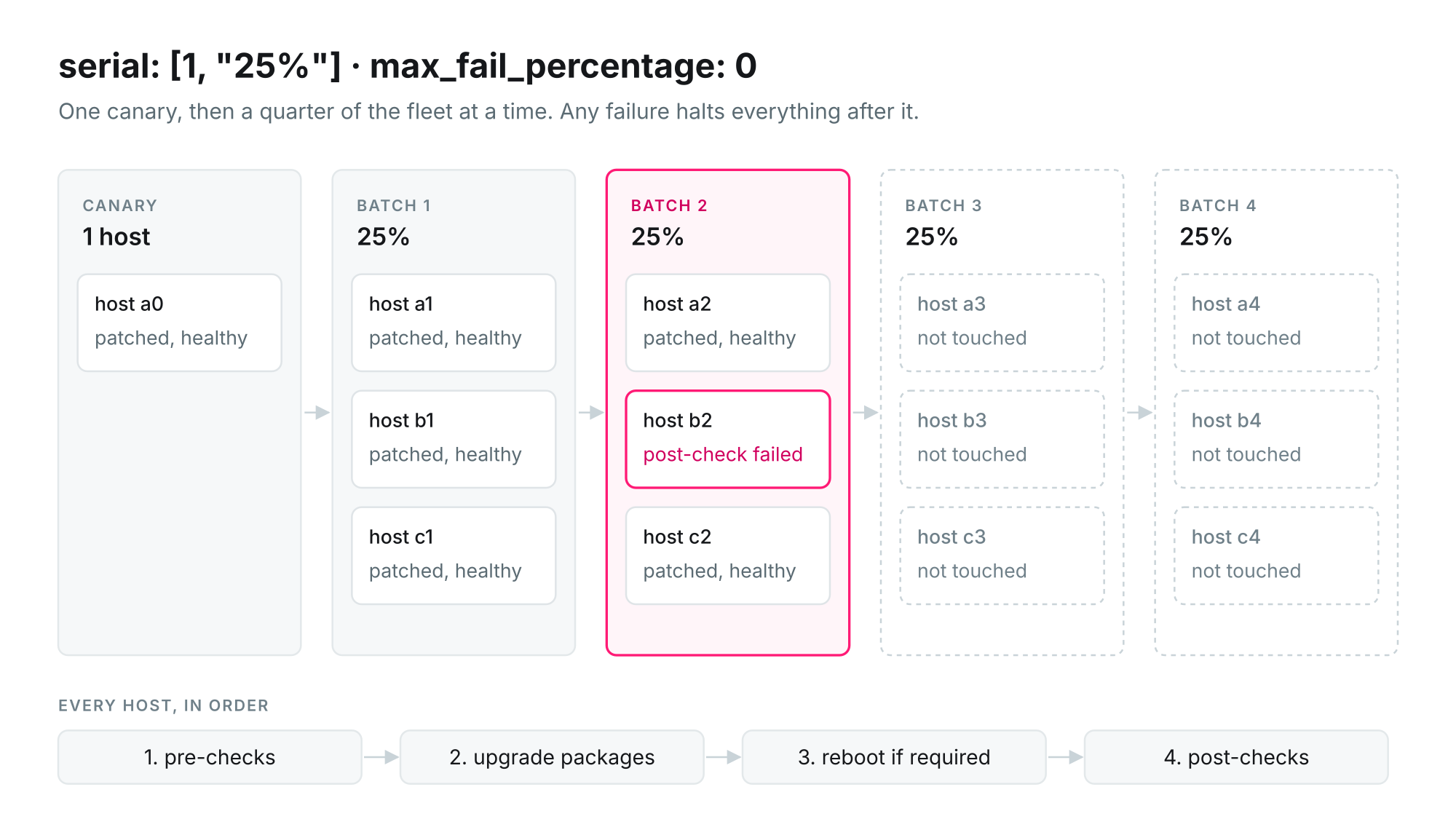
serial: [1, "25%"] changes the play into a sequence of batches. The first batch is a single host, the canary. Every following batch is a quarter of the group. A batch runs the whole play, from pre-checks to post-checks, before the next batch starts.
max_fail_percentage: 0 is the other half. It means: if any host in a batch fails, stop the play. The hosts already patched stay patched, the failed host is left for you to look at, and the batches after it are never touched. Figure 1 shows what that looks like when a post-check fails in the second batch.
Two practical notes. Put servers that serve the same traffic into the same group, so a batch never takes out all members of a cluster at once; with three web servers and 25%, each batch holds one of them. And if your servers sit behind a load balancer, add a pre_tasks step that drains the host and a post_tasks step that puts it back, using delegate_to to run those calls on the balancer rather than on the server being patched.
Reboot only when the server needs it
Rebooting every server after every patch run is safe but wasteful, and on databases it is a real cost. Most patch runs only update user-space packages, which do not need a reboot. A new kernel or a new glibc does.
The two distribution families report this differently, which is why the playbook has two checks (Figure 2):
- Debian and Ubuntu write the file
/var/run/reboot-requiredwhen an installed package asks for a reboot. The playbook checks whether it exists withansible.builtin.stat. - RHEL, Rocky and Alma have
needs-restarting -r. It exits with code1when the kernel or a core library changed since boot, and0when no reboot is needed. Because exit code 1 is an answer and not an error, the task setsfailed_when: rhel_reboot.rc not in [0, 1].
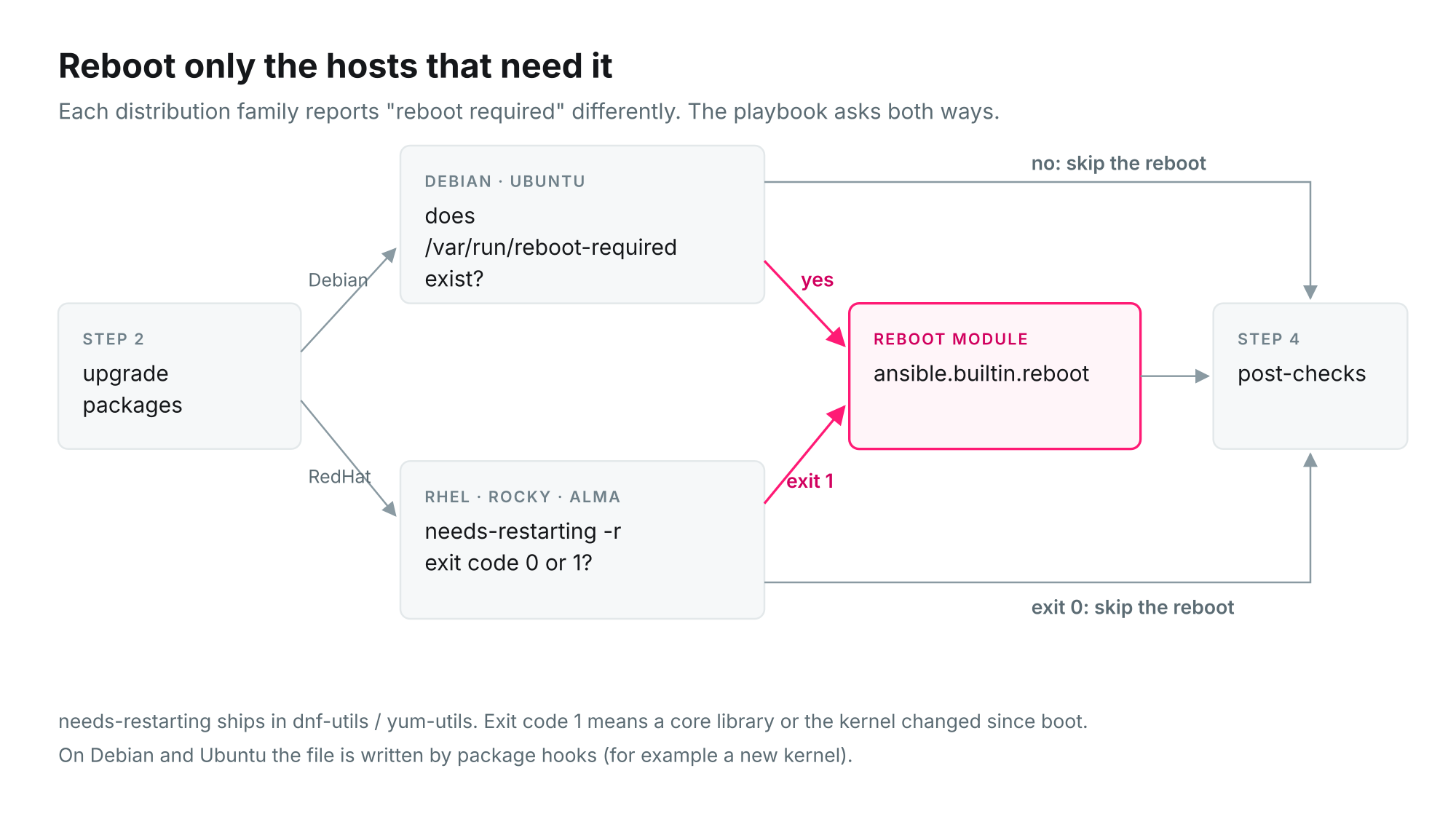
ansible.builtin.reboot then reboots the host, waits until it answers on SSH again, and only then lets the play continue. reboot_timeout: 900 gives slow physical servers fifteen minutes to come back. If the host does not return in time, the task fails, and max_fail_percentage: 0 stops the rollout.
The default() filters in the when: condition matter. On a Debian host the RHEL check is skipped, so rhel_reboot has no rc; without the default, the condition would fail on a mixed fleet.
Pre-checks and post-checks
The playbook does the minimum on both sides of the update. It is worth extending, because these checks are what turn "the updates installed" into "the server still does its job".
Before patching, check what would make the update fail halfway. Free disk space is the classic one, and the playbook asserts at least 2 GB on /. Other useful checks: that a recent backup exists, that no snapshot is still lying around from last time, and that monitoring is paused for the maintenance window so nobody gets paged for a planned reboot.
After patching, check what users would notice. The playbook verifies that every service in critical_services is running and, where a health_port is set, that the application answers its health endpoint. Set those per host or per group in your inventory:
# group_vars/linux_prod.yml
critical_services:
  - nginx
  - chronyd
health_port: 8080
A failed post-check fails the host, and that is exactly what you want: the rollout stops at the first server that came back unhealthy, instead of finding out on the last one.
Security updates only
If you want to install security fixes now and leave feature updates for a planned window, the RHEL family supports it directly:
    - name: Install security updates only (RHEL family)
      ansible.builtin.dnf:
        name: "*"
        state: latest
        security: true
      when: ansible_facts.os_family == "RedHat"
On Debian and Ubuntu, apt has no equivalent switch. The usual approach there is unattended-upgrades configured for the security pocket, with Ansible running the full upgrade in the maintenance window.
Test it, then schedule it
- Dry run:
ansible-playbook -i inventory.ini patch-linux.yml --limit linux_test --check --diffshows what would change without changing it. Expect the reboot check to be skipped in check mode, becauseneeds-restartingis a command. - One host:
--limit web-01patches a single server when you want to watch it closely. - Hold a package back: add
exclude: kernel*to thednftask, or mark the package withansible.builtin.dpkg_selectionsset toholdon Debian, when a vendor has not certified the new version yet. - Schedule: a cron entry on the control node is enough to start with. If you want a web UI, schedules, credentials management and job history, AWX, the open-source web interface for Ansible, runs the same playbook unchanged.
Patching Windows servers too?
The same approach works for Windows with a different set of modules (win_updates, WinRM instead of SSH) and different checks. We walk through it, including a full AWX workflow, in Fully Automatic Windows Server Patching with Ansible.
Coordinating patching across a mixed Windows and Linux estate is also the subject of our Patch Orchestration page.